Most portrait management software services can export school photos and associated data into a format designated by the Professional School Photographers Association (PSPA). Yearbook software can import this PSPA format package for yearbook design teams to use for their portrait page design.
A PSPA format portrait package consists of one or more folders containing standard-sized portrait photos and a data file named index.txt that describes the people in the photos. School photography companies may choose to send the portrait package to their school yearbook committee as a .zip archive, or may import the package into Memento directly if they manage your account.
The index.txt data file that accompanies the portrait photos follows a standardized system: 1 row per person, with their relevant information presented in a particular order of columns. This file may be opened in a notepad or spreadsheet application, such as excel, should it need to be verified.
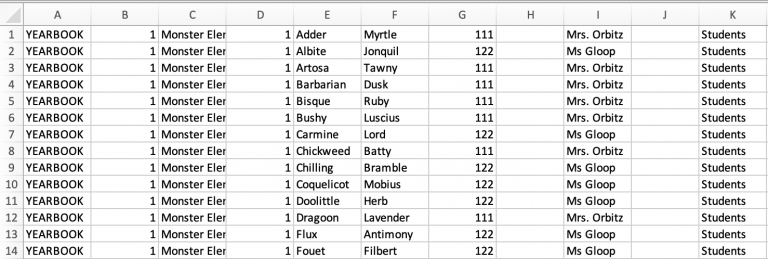
| INDEX.TXT FORMATTING A - Volume name - School name, code, or "yearbook" B - Image Folder - The folder holding the images. C- Image File Name - Portrait image file names, showing the file extension (.jpg) D- Grade - The grade assigned to the person. Teachers may be assigned to their homeroom or to a Staff/Faculty grade. E- Last Name - The individual’s last name. eg. “Smith”. F- First Name - The individual’s first name. eg “Joan”. G- Homeroom - A classroom assignment, usually for elementary and some middle schools. H- Period - Usually blank, or a numeric value. I- Teacher Name - The name or identifier for the individual’s teacher. eg. Jones”. J- Track - Usually blank. May indicate a special program. K - Department - Usually blank. L - Title - Usually blank, but may Indicate courtesy title such as Mr. Mrs. And Dr or a position in the school (eg. librarian) M- Image Size - Indicates image size such as Small Large or Other. * Required for all imports ** Homeroom or Teacher required for elementary books with portrait pages by class. |
Note to portrait studios : Open the "SPOA Digital Guidelines & Standards" provided by the School Photographers of America for more detailed information about the PSPA file format.
Memento enhancements to portrait data
The PSPA standard excludes important info that can help build your portrait pages. It does not include a role for people at the school -- (Students, Teachers, Administration, etc.) or job hierarchy relative to each other (Principal, Vice Principal, Teacher, Assistant Teacher, Student).
Memento Yearbook offers extra categories in its portrait manager to allow this missing information to be entered, so you can build custom portrait panel pages with ease. While you could add this information in your index.txt file in a spreadsheet software like Excel or Google Sheets, we recommend using Memento's Assign Role feature, so you can quickly add information to selected individuals to get them into the right places on your pages, such as placing senior administrators and homeroom teachers at the top of their portrait pages, or grouping staff by department.
Need help troubleshooting your portrait import? Consult the Portrait Database Issues and Errors article.
Was this article helpful?
That’s Great!
Thank you for your feedback
Sorry! We couldn't be helpful
Thank you for your feedback
Feedback sent
We appreciate your effort and will try to fix the article